ACR122U
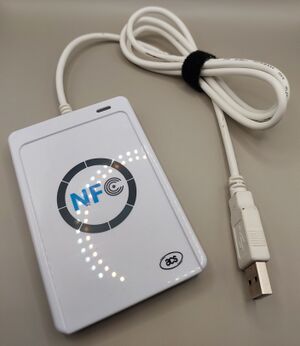
The ACR122U, also sold as ACR122, is a USB NFC reader in a finished case with a built-in cable, status LED, and beeper. It can scan supported Zaparoo NFC tags and cards, but it has more compatibility caveats than the PN532 USB.
Internally it uses a PN532 NFC chip, but the host device does not talk to that chip the same way it talks to PN532 USB modules. Zaparoo uses different ACR122U drivers depending on the platform.
If you're buying your first reader, a PN532 USB is a safer choice. It avoids the ACR122U clone compatibility issues described below. The Zaparoo Shop stocks official PN532 readers that support the project.
The ACR122U is no longer produced by its original designer ACS, so new listings are usually clone hardware. Internal differences between clones can affect Zaparoo compatibility, and they are not always visible from the listing. Some clones only work through PC/SC, which means they may work on Windows but fail on Linux-based Zaparoo platforms where Zaparoo Core uses libnfc for this reader.
Platforms
Zaparoo uses the libnfc ACR122U driver on Linux-based platforms. NTAG read/write support works, but MIFARE Classic write support is limited and some MIFARE cards may need manual formatting or may not work. The reader LED and beeper also do not work with this driver, and some clone variants are incompatible.
Configure the reader
On Linux-based platforms, Core uses the libnfcacr122 driver. It is enabled, but it does not search for the reader until you turn on auto-detect for it in config.toml:
[readers.drivers.libnfcacr122]
auto_detect = true
The driver does not need a PC/SC daemon, but some clone variants are incompatible, and it is normal for the reader LED and beeper not to react when scanning a card.
On Windows, Core uses the acr122pcsc driver through PC/SC and auto-detects the reader. This can scan tags, but writing tags through Zaparoo is not supported with this driver.
Manual configuration
If auto-detection fails or you need to specify a particular reader, you can manually configure it.
On Windows, the path must match the PC/SC reader name:
[[readers.connect]]
driver = "acr122pcsc"
path = "ACS ACR122 0"
To find the PC/SC reader name, check Device Manager under Smart card readers.
Linux-based platforms
An ACR122U on Linux-based platforms is detected once auto-detect is turned on for the libnfcacr122 driver, as shown above. If the reader is detected but the LED and beeper do not react, that is expected with the libnfc driver.
If the reader lights up or beeps but Core does not detect scans, it may be a clone that only works through PC/SC.
Windows
On Windows, the reader should appear under Smart card readers in Device Manager. The LED usually lights red and flashes green when a card is scanned. The reader may also beep on scan.
The Windows PC/SC driver can scan tags, but it cannot write tags through Zaparoo. If you want to write tags from Zaparoo, use a PN532 USB or the Zaparoo App instead.
Troubleshooting
If Windows does not detect the reader, check these items:

Enable the Smart Card Plug and Play service via regedit:
| Description | Value |
|---|---|
| Registry Hive | HKEY_LOCAL_MACHINE |
| Registry Path | SOFTWARE\Policies\Microsoft\Windows\ScPnP |
| Value Name | EnableScPnP |
| Value Type | REG_DWORD |
| Enabled Value | 1 |
| Disabled Value | 0 |
Install the official ACS ACR122U driver. You can confirm it is working when ACR122 Smart Card Reader appears in the Smart card readers section of Device Manager.
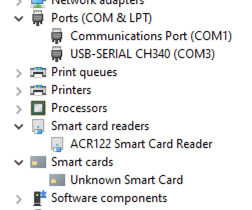
Make sure Smart Card and Smart Card Device Enumeration are running in the Services Manager. Their startup types should be Automatic and Automatic (Trigger Start).
Reboot Windows after changing drivers, registry values, or services.
Where to buy
The ACR122U can be found by searching for "ACR122U" on sites like Amazon, eBay and AliExpress.
Please be aware there's still a risk of receiving an incompatible variant even from these listings.
These are some known working listings submitted by users: