External Drive Reader
A USB stick or SD card can work as a Zaparoo token. Put a zaparoo.txt file on the drive, plug it into the device running Core, and Zaparoo scans the file contents.
This is useful if you want physical tokens without buying NFC cards or a separate reader.
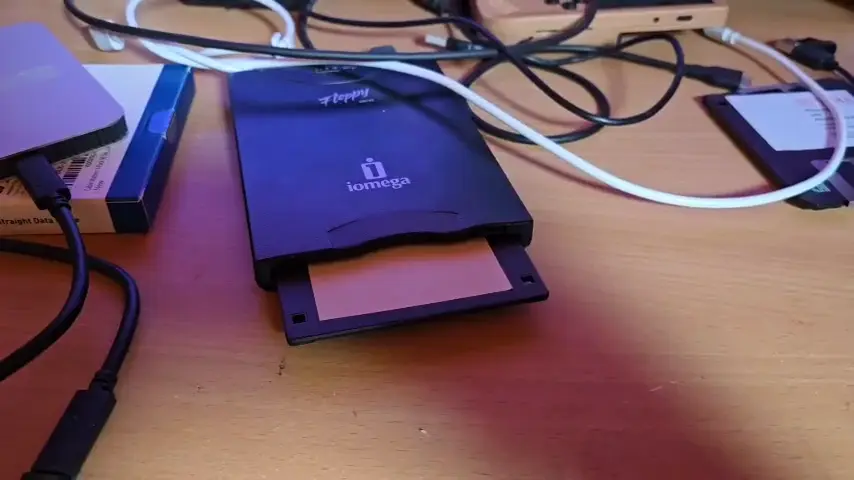
A USB floppy drive used as removable token media by Galewin in Community Showcase #5. USB sticks and SD cards work the same way.
Platforms
Enable the reader
The reader is disabled by default. Add this to your config.toml:
[[readers.connect]]
driver = "externaldrive"
enabled = true
Restart Core after changing the config.
A readers.connect entry makes this reader active unless you have explicitly disabled the driver elsewhere. You can also enable the driver directly:
[readers.drivers.externaldrive]
enabled = true
Make a drive token
- Format a USB stick or SD card using a filesystem your device can mount.
- Create a plain text file named
zaparoo.txtat the top level of the drive. - Put the ZapScript in the file.
- Eject the drive, then insert it into the device running Core.
Example zaparoo.txt:
**launch.random:SNES
The filename is matched case-insensitively, so zaparoo.txt, ZAPAROO.TXT, and similar casing work. A burned data disc accepts the same file; see optical drive token files.
Launch media from the drive
You can store a game on the drive and launch it with a path relative to the drive's root. For example, save the game as GBC/Tetris.gbc, then put this in zaparoo.txt:
GBC/Tetris.gbc
Using a relative path means the token works without knowing where the drive will be mounted. For a game at the top level of the drive, add ?system= to identify its system:
Sonic.bin?system=Genesis
This is the preferred format when a file extension is used by several systems. Without ?system=, Core must infer the system from a recognized folder name or an extension unique to one system.
What happens when you insert it
When the drive mounts, Core looks for zaparoo.txt. If it finds one, it trims surrounding whitespace and scans the remaining text as an externaldrive token. On Linux, Core can also find the file on sibling partitions mounted under /media or /mnt, which helps with multi-partition USB drives.
Removing or ejecting the drive clears the active token, similar to removing an NFC card from a reader.
Core ignores the file if:
- It is empty or only contains whitespace
- It is inside a folder instead of at the top level of the drive
- It is a folder named
zaparoo.txtrather than a file - It is a symlink
- It is larger than 1 MiB
The reader does not write anything back to the drive. You create and edit zaparoo.txt yourself.
Detected drives
Core watches for removable drive mount events. It does not scan every mounted disk on the system, and that distinction matters for USB hard drives.
- Windows detects drives reported by Windows as removable, such as many USB sticks and SD card readers.
- Linux uses UDisks2 when available. Without UDisks2, Core falls back to
/proc/mountsand only watches removable mounts under/mediaor/mnt. - MiSTer, Batocera, SteamOS, and similar Linux-based systems depend on the fallback behavior if UDisks2 is not available.
- macOS detects removable volumes mounted under
/Volumes.
Some USB hard drives and SSDs are reported by the operating system as fixed or internal disks. Those may not be picked up by this reader.
Troubleshooting
Drive not detected
Check your config first:
[[readers.connect]]
driver = "externaldrive"
enabled = true
If you use driver settings, make sure the driver has not been disabled:
[readers.drivers.externaldrive]
enabled = true
Then check the basics:
- Restart Core after changing
config.toml. - Confirm the operating system mounted the drive.
- On Linux-based systems, check whether the drive mounted under
/mediaor/mnt. - Enable
debug_logging = trueinconfig.tomland check the Core logs.
File ignored
Make sure zaparoo.txt is a normal text file at the top level of the drive. The name can use any case.
The file must not be empty, whitespace-only, a symlink, or larger than 1 MiB.
ZapScript not running
Test the same text with another reader or through the app. If it still does not work, the ZapScript probably needs fixing.
Check the ZapScript docs for syntax.