Zaparoo Frontend v2.0.0: Rebuilt for MiSTer

Zaparoo Frontend v2.0.0 is a rebuilt MiSTer interface. This release gets the rewrite out for feedback and testing on your setups.
If waiting put you off the old Frontend, I'd like you to try this version and tell us how it feels on your MiSTer.
Zaparoo Core v2.19.0 is already out, with artwork downloads, more MiSTer launchers, and library and launch fixes.
Download and update
On MiSTer, use Update All to update Frontend and Core together. If you install by hand, update both. The new artwork downloader needs Core v2.19.0.
For a manual Frontend update, copy the complete zaparoo folder from the release ZIP, including modules/ if provided. Keep Frontend, MiSTer Main, and the menu core from the same bundle together, especially if you use a CRT. Follow the manual install steps.
The Slint rewrite
The old Frontend used Qt to draw its menus. We've replaced it with Slint, another toolkit for building interfaces, and reworked the MiSTer display code around it. That meant rebuilding the screens, navigation, and controller input rather than changing the appearance of the old interface.
For this release, the priority is getting that replacement into use and finding what needs fixing across different setups. Core still manages your library, artwork, favorites, and token actions. The next Frontend release will focus on new features built on this codebase, informed by what we learn from 2.0.
Browsing and responsiveness
Frontend can fetch more covers at once and puts them on screen in batches, with priority given to the games you're looking at. Queued requests for images you've scrolled past are dropped. Core also serves artwork it has already prepared without going back through the original images.
Keep a direction pressed and scrolling speeds up from rows to pages, then letters. A rail along the edge shows where you are in the alphabet, while game names, favorite marks, and artwork already loaded stay visible. See browsing and controls.
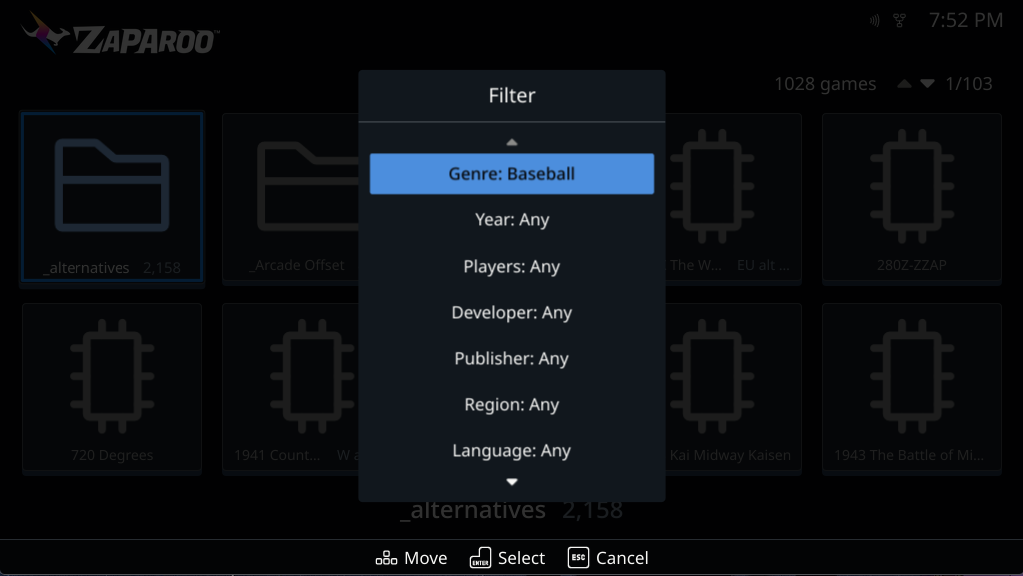
View > Filter narrows a system's games by genre, year, players, or other tags. Hide in a game's options menu keeps it out of normal browsing.
MiSTer MagiK's display work
Thank you to Nigel Breslaw, creator of MiSTer MagiK. Zaparoo's accelerated HDMI display path builds on his scanout work, the part that gets finished frames onto the display in step with its refresh. That work gives us a basis for smoother motion without drawing over a frame that's still on screen.
The accelerated path is selected automatically on compatible HDMI setups when the matching display bundle is installed. CRT, Direct Video, and unrecognized kernels keep their existing display paths.
Help test Frontend on MiSTer
Use it for the things you normally do: browse your library, open game details, launch a game, and return to Frontend. Try your controller and keyboard, your artwork, and your display settings. HDMI, CRT, and rotated setups are all useful to hear about.
If something breaks, responds slowly, or behaves differently from the old version, report it on our Discord or Frontend GitHub. Include your Frontend and Core versions, display setup, and the steps that led to it. Settings > About > Upload log file gives you a support bundle to share.
Core v2.19.0
Core's work on artwork loading and library requests helps the rebuilt Frontend, but this release also has changes you can use without Frontend.
Download artwork from libretro
Core can download box art, screenshots, and title screens from the libretro thumbnail server, the same source used by RetroArch. You don't need RetroArch installed or a local artwork pack prepared beforehand.
In Frontend, open Settings > Library > Maintenance > Update metadata, choose libretro thumbnails as the Source, pick your systems, and select Start import. Run a media database update first if your games haven't been indexed yet. Core saves the images on your device for offline browsing.
This source downloads images, not descriptions or manuals, and some games have no matching artwork. Existing Update All packs, gamelist.xml files, and media folders still work. See Add Artwork and Metadata for sources and refresh options.
More MiSTer launchers
Core adds 62 launcher definitions for official and community MiSTer cores, including Marty, PC-FX, Mac LC, and Quadra 800, plus alternate cores for existing systems. Install the cores themselves, then update the media database so Zaparoo can find their games. Some need BIOS files, extra SDRAM, or a newer or patched MiSTer Main. The MiSTer launcher reference lists folders and file formats.
Library and launch changes
- Metadata imports use less memory, and Core fixes timeouts in the terminal UI's scrape setup.
- ZapScraper's
games/mame/gamelist.xmloutput is found automatically for Arcade, without a custom path. See MiSTer arcade gamelists. - Recognized Arcade set archives and ScummVM launch files get readable titles.
dkong.zipbecomes Donkey Kong andsky.scummvmbecomes Beneath a Steel Sky. Update the media database to apply them.
There are also fixes for title-based tokens picking the wrong sequel, BIOS files appearing as games, alternate-core screenshots, and tracking games launched from relative MGL paths. Thank you to Utkarsh Bhangale for fixing Atari800 cartridge loading and disk booting on MiSTer.
For Core feedback and bug reports, use Core GitHub or the same Discord. Include your Core version, platform, and what you were doing.